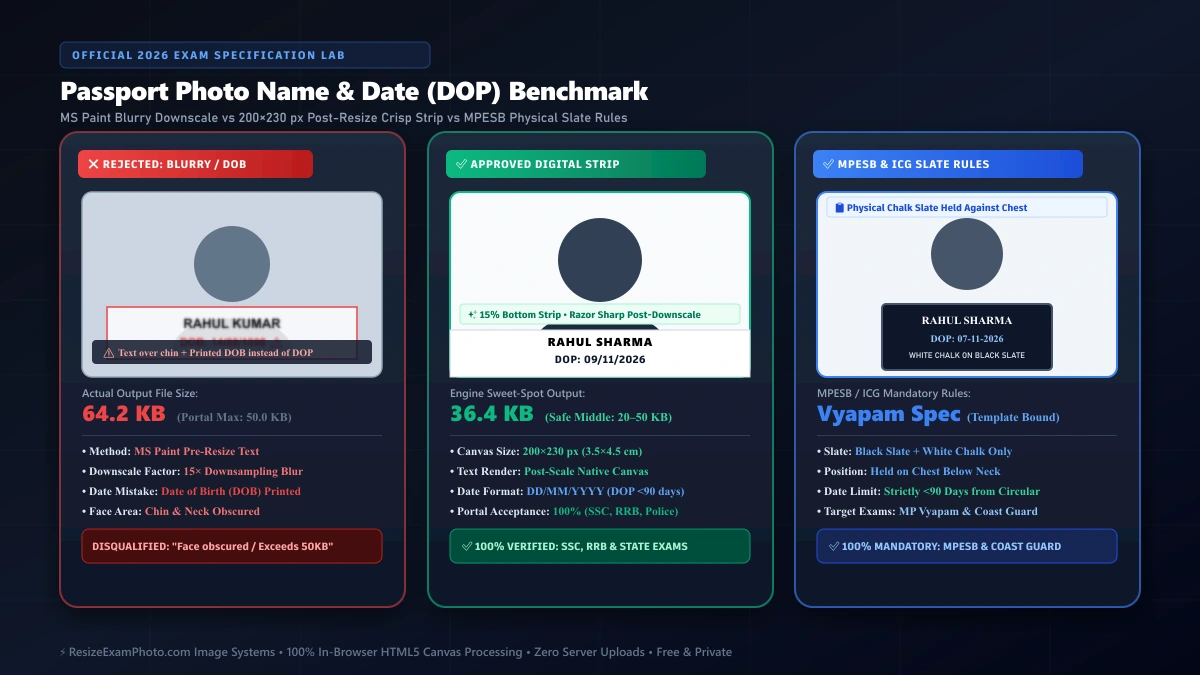
To add a crisp Name and Date of Photo (DOP) within a 20KB–50KB limit, resize the passport image to 200×230 pixels (3.5cm × 4.5cm) first, reserve a 15% pure white (#FFFFFF) bottom strip below the shoulders, and render bold black Arial/Sans-Serif text in DD/MM/YYYY format.
1. Why Your Name and Date Turn Blurry When Compressing a Photo to 20KB–50KB (The MS Paint & WhatsApp Trap)
Every recruitment cycle, tens of thousands of applicants fail portal validation because their candidate name and Date of Photograph (DOP) are completely unreadable. Candidates routinely follow intuitive workflows: they take a portrait with a 12 MP or 50 MP phone camera, open it in Microsoft Paint, Canva, or a gallery markup tool, type their name across the bottom, and then pass the file through a generic compressor app to shrink it from 4 MB down to under 50 KB.
The result is almost always disastrous. The portrait appears acceptable, but the letters look like smudged grey blocks. To understand why this happens, look at the underlying digital raster mathematics:
The Downsampling Math Breakdown
- • Original Smartphone Image: 3000 × 4000 pixels (12 Megapixels)
- • Text Stroke Width Drawn in Paint: 16 pixels wide
- • Target Portal Dimensions: 200 × 230 pixels (Standard 3.5 × 4.5 cm canvas)
- • Downsampling Ratio: 3000 / 200 = 15.0× Linear Downscale Factor
- • Resulting Text Stroke Width: 16 px / 15 = 1.06 pixels
When a 16-pixel letter stroke is crushed down to barely 1 pixel, bicubic and bilinear interpolation algorithms calculate an average color between the solid black ink (#000000) and the white background (#FFFFFF). The sharp character edges turn into muddy grey gradients (#808080).
This problem is compounded by standard JPEG chroma subsampling (4:2:0). JPEG compression separates image data into luminance (brightness) and chrominance (color). In 4:2:0 subsampling, color resolution is halved both horizontally and vertically. While human eyes do not easily notice softened color transitions in skin tones, high-contrast black typography on a white background loses crisp line definitions, resulting in severe compression ringing and mosquito noise around letters.
The Solution: Render Typography *After* Canvas Downsampling
The engineering solution implemented in our browser engine is straightforward: the original high-resolution photo is scaled down to the final target canvas (such as 200×230 px or 275×354 px) first. Only after the canvas dimensions are locked is a solid 15% white rectangle (#FFFFFF) drawn across the base, followed by vector-grade black typography rendered directly onto the final resolution pixels. Because the letters are never subjected to downscaling interpolation, every character stroke retains 100% optical density and razor sharpness even when compressed to 25 KB or 35 KB.
⚡ Add Name & Today's Date on Your Photo (20KB–50KB)
Locks canvas to 200×230 px first, renders crisp text on a pure white strip, and guarantees 20KB–50KB bounds.
2. Official Format for Name & Date on Exam Photos (Font, Position, Strip Height & DD/MM/YYYY Rules)
Recruitment notices published by bodies such as the Staff Selection Commission (SSC), Railway Recruitment Boards (RRB), Madhya Pradesh Employees Selection Board (MPESB), and State Public Service Commissions define exact parameters for text stamping. Deviating from these conventions invites scrutiny or disqualification.
1. Bottom Strip Placement & Height
The label strip must occupy strictly the bottom 12% to 15% of the total photograph height. On a standard 230-pixel tall canvas, this corresponds to approximately 28 to 35 pixels. It must rest squarely across the candidate's shirt/chest area. It must never overlap the chin, throat, or jawline. Portals enforce facial detection algorithms that check for uninterrupted facial contours; covering the lower chin triggers an automated "Face Obscured" upload error.
2. Color Contrast & Typography
The label box must be a 100% opaque, solid pure white (#FFFFFF) rectangle. Never use transparent, faded, or patterned fills. Typography must be solid pitch black (#000000) in standard sans-serif block capitals (such as Arial Bold, Roboto Bold, or Helvetica). Never use decorative, handwritten, or cursive fonts. The candidate's name should be on the top row, and the date on the row immediately below.
CRITICAL WARNING: Date of Birth (DOB) vs. Date of Photograph (DOP)
Printing your Date of Birth (DOB) instead of the Date on Which the Photograph Was Taken (DOP) is the single most common administrative reason candidates get rejected during document verification.
- • What portals require: Proof that your uploaded portrait is recent (usually taken within the last 90 days).
- • What happens if you print your DOB: The scrutiny officer will assume your photo was taken on the day you were born or flag the document as invalid, leading to immediate rejection without a correction window.
- • Correct Format: Always prefix the date clearly:
DOP: 15/10/2026or simply15/10/2026. - • 90-Day Validity Rule: Ensure the date printed is not older than 3 months (90 days) from the official notification date of the recruitment exam.
3. Physical Slate / Placard Photo vs. Computer-Typed Digital Strip: Which Exams Require Which?
Confusion between physical slates and digital text strips causes widespread candidate anxiety. Let us break down the exact official guidelines across Indian recruitment boards:
When a Computer-Typed Digital Strip is Accepted
Modern central and state portals accept clean, digitally stamped white strips. For example, Railway Recruitment Board notices (such as RRB NTPC, ALP, and Group D) that mention name and date formatting allow computer-edited text strips placed at the bottom, provided the facial framing is unobstructed. State police recruitment portals (Uttar Pradesh Police PRPB, Rajasthan Police, Bihar Police CSBC, and Haryana HSSC) and Teacher Eligibility Tests (CTET, UPTET, REET) consistently approve digital bottom strips.
When a Physical Chalk Slate is Mandatory (MPESB & Coast Guard)
Certain boards strictly disallow computer-added text strips. The primary example is the Madhya Pradesh Employees Selection Board (MPESB / MP Vyapam) for Constable, Sub-Inspector, Primary Teacher, and Group 2/4 examinations. In their official rulebook, MPESB explicitly requires:
"The applicant must hold a small black slate against their chest with their Name and the Date of Photograph clearly written in white chalk. Photographs with computer-typed text added later will be rejected during application verification."
The Indian Coast Guard (ICG Navik GD, DB, and Yantrik) enforces an identical physical black slate requirement. If you are applying for MP Vyapam or Indian Coast Guard, you must write your name and date with white chalk on a slate held against your chest before taking the photo. For SSC, Railway, Banking, and all other state exams, a clean computer-generated digital strip is fully accepted.
📮 Applying for India Post GDS 2026?
Resize GDS-specific 4:5 ratio photos (30KB–100KB) and candidate signatures (10KB–20KB) in seconds.
4. Photo Par Name Aur Date Kaise Likhe Online (Mobile Step-by-Step Guide in Hindi/Hinglish)
Cyber cafe par paise kharch kiye bina apne smartphone se 2 minute me passport photo par name aur date add karne ka sabse asaan tarika niche diya gaya hai:
Photo Select Karein (Upload Image)
Humare Photo Resizer Tool (20KB–50KB) par jayein aur "Choose File" par tap karke apni passport photo gallery se select karein. Dhyan rahe photo me background plain white ya light ho aur dono kaan saaf dikh rahe hon.
"Add Name & Date" Toggle On Karein
Tool ke options me "Add Name & Date" checkbox ko check karein. Do input boxes khulenge: pehle box me apna poora naam (jaise: RAHUL SHARMA) CAPITAL LETTERS me likhein aur dusre box me photo lene ki tareekh (jaise: 09/11/2026) enter karein.
Live Preview me Text Position Check Karein
Screen par live preview dekhein. White strip photo ke sabse niche 15% hisse par hogi aur candidate ki chin (thodi) ke bilkul niche honi chahiye. Agar face frame sahi nahi hai, toh cropper se frame ko adjust karein taaki chehra 75% hissa cover kare.
Download JPG (Size Locked at 20KB–50KB)
"Download JPG" button par click karein. Tool automatically file size ko 20.0 KB se 50.0 KB ke beech (lagbhag 32–38 KB) set karke clean JPEG download karega. Text 100% sharp aur readable rahega aur portal upload me koi error nahi aayega.
🚆 Applying for Railway RRB NTPC or Group D?
Format 240×320 px photos (30KB–70KB) with Name/DOP and 140×60 px signatures for rrbapply.gov.in.
5. 2026–27 Exam-Wise Name & Date on Photo (DOP) Official Rules Matrix
Every recruitment portal enforces distinct guidelines regarding whether candidate details must appear on the uploaded portrait. Consult this master matrix before submitting your online form:
| Exam Board / Portal | Is Name & Date Mandatory on Photo? | Required Strip Format | Exact Pixel & CM Size | Allowed KB Limit |
|---|---|---|---|---|
| MPESB (MP Vyapam - Police, TET, Group 2/4) | Mandatory (Strict Rejection if Missing) | Physical black slate with Name + DOP written in white chalk (<3 months old) | 200 × 230 px (3.5 × 4.5 cm) | 20 KB – 50 KB (or template limit) |
| SSC (ssc.gov.in Live Photo vs Fallback) | Not required on Live Webcam; printed DOP advised on fallback uploads | Clean unobscured face (75% coverage), plain white backdrop | 200 × 230 px (or 275 × 354 px) | 20 KB – 50 KB |
| Railway Recruitment Board (RRB NTPC, Group D, ALP) | Optional/Recommended per zone notice (Never print DOB) | Bottom white strip (Max 15% height), bold black font | 240 × 320 px (or 200 × 230 px) | 30 KB – 70 KB (or 20 KB – 50 KB) |
| Coast Guard (ICG Navik GD/DB & Yantrik) | Mandatory Physical Slate | Candidate holding black slate on chest with Name & DOP in white chalk | 200 × 230 px | 10 KB – 100 KB |
| India Post GDS & Banking (IBPS / SBI) | Not Required (Plain passport photo preferred) | No text over face or shoulders; pure white background | 320 × 400 px (4:5) or 200 × 230 px | 30 KB – 100 KB / 20 KB – 50 KB |
6. Why Exam Portals Reject Name & Date Photos (Error vs. Fix Cheat Sheet)
Review these four frequent upload errors before completing your application to guarantee first-time acceptance:
| Common Rejection Mistake | Underlying Technical Cause | Portal Disqualification Impact | Exact Technical Correction |
|---|---|---|---|
| Printing Date of Birth (DOB) instead of DOP | Candidate types personal birth date instead of the date the photo was captured. | Disqualified at Document Verification (DV) for non-conformance with 90-day recency rule. | Print the date the camera clicked the portrait: DOP: DD/MM/YYYY within 90 days of notification. |
| Text overlapping the chin or neck area | White strip height set too tall (>20% of canvas) or placed too high up on the frame. | Automated AI face detection flags the image as "Face obscured / Biometric invalid". | Constrain strip to bottom 12%–15% across shoulders; leave chin completely unobstructed. |
| Grey or semi-transparent strip with cursive font | Candidate uses social media markup tools with semi-transparent banners or stylized fonts. | Text fails optical character recognition (OCR) or is flagged as an altered image. | Use 100% opaque solid white (#FFFFFF) background with black uppercase Arial or Sans-Serif font. |
| File size <20KB or >50KB after adding text | Generic photo apps save output at uncalibrated compression factors (e.g., 68 KB or 14 KB). | Server rejects file with "File size must be between 20 KB and 50 KB". | Use our 20KB–50KB Resizer which auto-locks file size within 25–40 KB. |
Explore Related Exam Troubleshooting Guides
7. Frequently Asked Questions: Name & Date on Passport Photos (English & Hinglish)
Mobile se passport size photo par name aur date kaise likhe (20KB to 50KB)?↓
Mobile se passport photo par name aur date likhne ke liye kisi complex photo editor ya MS Paint ki zaroorat nahi hai. ResizeExamPhoto.com ke free 20KB–50KB Resizer tool par apni photo upload karein. 'Add Name & Date' toggle on karein, apna poora naam CAPITAL LETTERS me likhein aur photo khinchne ki tareekh (Date of Photo - DOP) DD/MM/YYYY format me daalein. Tool automatically photo ko 200×230 pixels me resize karke bottom me 15% solid white strip lagata hai aur text ko razor-sharp render karta hai. File size automatically 20.0 KB se 50.0 KB ke safe middle zone (lagbhag 35 KB) me lock ho jaati hai.
Should I write Date of Birth (DOB) or Date of Photo (DOP) on my exam photograph?↓
You must ALWAYS write the Date of Photograph (DOP) — the exact date on which the picture was captured — and NEVER your Date of Birth (DOB). Printing your Date of Birth is the number one cause of automatic rejection during document verification for government exams like MPESB, Railway, and State Police recruitment. Notifications explicitly require proof that the photograph is current, typically mandating that the DOP must be within 90 days (3 months) of the official notification release date.
How old can the Date of Photo (DOP) be for SSC, Railway, and State Police exams in 2026?↓
For almost all Indian government examinations (SSC legacy uploads, RRB NTPC/Group D, UP Police, Bihar Police, and MPESB Vyapam), the photograph must not be older than 3 months (90 days) from the date of the recruitment notification. If a notification was issued on 1st October 2026, the DOP printed on your photo should ideally fall between 15th August 2026 and the day you submit your application. Writing a date older than 90 days or a future date triggers immediate disqualification during scrutiny.
Why does the name and date text become blurry after compressing the photo to 20KB?↓
This happens because of a fundamental image downsampling trap: when you type text onto a high-resolution 3000×4000 pixel mobile photo and then use a standard compression app to shrink the file to 20KB–50KB (200×230 pixels), the bicubic downscaling algorithm averages fine black text pixels with surrounding white background pixels. This anti-aliasing math turns sharp letter glyphs into muddy grey mush. Additionally, standard JPEG 4:2:0 chroma subsampling destroys high-contrast edges. To keep text razor sharp, the image must be resized to 200×230 pixels FIRST, and the text must be drawn natively onto the final canvas resolution.
Is computer-typed name and date allowed, or do I need to hold a physical black slate?↓
It depends strictly on the exam conducting board. Central recruitment bodies like Railway Recruitment Boards (RRB), SSC fallback uploads, CTET, and State Police boards (UP, Rajasthan, Bihar) fully accept computer-generated digital white strips with black typed text. However, examinations conducted by MPESB (Madhya Pradesh Employees Selection Board / MP Vyapam) and the Indian Coast Guard (ICG Navik GD/DB) explicitly mandate a physical black slate held across the candidate's chest with their name and date of photo handwritten in clear white chalk. Always check your specific notification before deciding between digital strip and physical slate.
Photo par naam aur date likhne ke baad size 20KB se 50KB ke beech kaise set kare?↓
Text add karne ke baad photo ka size aksar ya toh 50KB se bada ho jata hai ya 15KB se chhota. Isko fix karne ke liye humara tool client-side binary search compression use karta hai. Yeh canvas ko standard 200×230 pixels par render karta hai aur quality factor ko automatically adjust karke output file ko strictly 25 KB se 40 KB ke beech target karta hai. Agar image ka size 20KB se kam reh jata hai, toh engine lossless metadata padding inject karke file size ko minimum 20.1 KB se upar secure kar deta hai taaki portal ka minimum byte gate fail na ho.