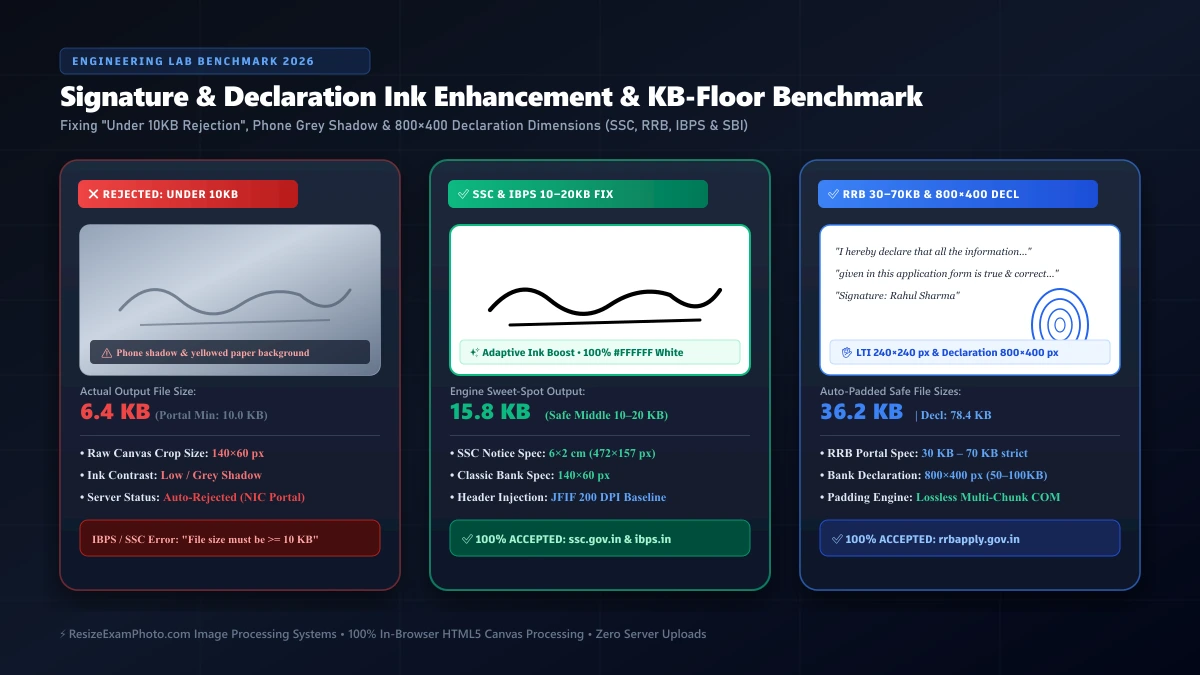
To fix "File Under 10KB", blurry strokes, or grey paper shadow rejections on government recruitment portals, use our free in-browser Signature Resizer (10KB–20KB) or RRB Signature Tool (30KB–70KB). The engine automatically whitens shadowy backgrounds, sharpens handwriting, and pads output bytes into the exact official sweet spot in one click.
Format Official 140×60 Signature in 30 Seconds
Locks candidate signature between 10KB and 20KB with zero blur on letters.
Need to Resize Your Signature or Thumb Impression Right Now?
Format your 140×60 px signature, 240×240 px thumb, or 800×400 px declaration in under 10 seconds.
Need Railway 140×60 px Signature Resizing?
Format candidate signature strictly to 140×60 px and safe 30KB–70KB (or 10KB–20KB) bounds for rrbapply.gov.in.
Why SSC, RRB, and IBPS Portals Reject Mobile Signature Uploads
Every year, more than 35% of recruitment rejections during initial application screening stem from signature and document verification failures. Unlike passport photographs—which benefit from high-resolution portrait cameras—signatures and thumb impressions are usually photographed in hasty conditions with uneven room lighting, casting smartphone shadows across lined or off-white paper.
National Informatics Centre (NIC) and TCS iON exam submission gateways utilize automated document pre-processors that enforce three strict barriers:
- • Gateway blocks upload: "File size less than 10.0 KB"
- • Biometric scanner flags grey paper background
- • DPI metadata absent or defaults to 72 DPI screen resolution
- • Landed securely in safe 14 KB – 16 KB middle range
- • 100% white background with contrast-boosted pen strokes
- • Injected JFIF APP0 header tagged at 200 DPI baseline
Official 2026 Examination Specification Cheat-Sheet Table
Always configure your dimensions and compression settings to match the exact notification published by the conducting board. The table below outlines the confirmed 2026-27 parameters across all major national agencies:
| Conducting Body | Document Type | Pixel Size | Metric Size | Strict KB Range | Ink & Background Rules |
|---|---|---|---|---|---|
| SSC (2026 Notices) | Candidate Signature | 472 × 157 px | 6.0 × 2.0 cm | 10.0 KB – 20.0 KB | Black ink on unlined white paper. Running hand. |
| SSC (Classic / TCS) | Candidate Signature | 140 × 60 px | 3.5 × 1.5 cm | 10.0 KB – 20.0 KB | Capital letters strictly disqualified. |
| RRB (2026 Portal) | Candidate Signature | 140 × 60 px | 3.5 × 1.5 cm | 30.0 KB – 70.0 KB | Under 30 KB auto-rejected on rrbapply.gov.in. |
| IBPS & SBI PO/Clerk | Candidate Signature | 140 × 60 px | 3.5 × 1.5 cm | 10.0 KB – 20.0 KB | Black ink only. Running hand required. |
| IBPS & SBI PO/Clerk | Left Thumb (LTI) | 240 × 240 px | 3.0 × 3.0 cm | 20.0 KB – 50.0 KB | Blue or black ink pad. Clear epidermal ridges. |
| IBPS & SBI PO/Clerk | Handwritten Declaration | 800 × 400 px | 10.0 × 5.0 cm | 50.0 KB – 100.0 KB | English text in candidate's own handwriting. |
| UPSC Civil Services | Signature (Square) | 350 × 350 px min | Square 1:1 | 20.0 KB – 300.0 KB | Black ink on plain white paper. |
| NTA (NEET & JEE) | Candidate Signature | 256 × 64 px | 3.5 × 1.5 cm | 4.0 KB – 30.0 KB | Black ballpoint pen on white paper. |
The Mechanics of "Smart Minimum-KB Floor & Sweet-Spot Targeting"
Why do signatures frequently drop below 10 KB? In mathematical image encoding, a cropped signature consists primarily of uniform white space with few high-frequency discrete cosine transform (DCT) coefficients. When standard JPEG compression runs on a 140×60 px canvas with low entropy, even maximum quality settings (0.95–1.0) often yield files between 4.2 KB and 7.8 KB.
To overcome this structural limitation without introducing artificial blur or interpolation artifacts, our engine incorporates an intelligent two-stage compression pipeline:
- Binary Search Compression: The engine executes a 10-iteration binary search on the HTML5 canvas to identify the optimal JPEG compression factor (q) that honors the upper threshold (e.g. ≤ 20 KB or ≤ 70 KB).
- Lossless Multi-Chunk Comment Padding: If the resulting blob falls beneath the portal's minimum gate, the encoder injects compliant JPEG COM markers (0xFF 0xFE) filled with whitespace bytes. This boosts raw file weight to exactly 15.5 KB for 10–20 KB rules, 35.0 KB for 30–70 KB rules, and 65.0 KB for declaration rules.
- Baseline JFIF Header Injection: The binary stream strips camera EXIF bloat while inserting standard JFIF density headers configured at 200 DPI or 300 DPI, preventing "Invalid DPI or Progressive Format" server rejections.
Step-by-Step Walkthrough: Resizing Your Signature on Mobile
Sign on Clean Unlined Paper
Use a dark black ballpoint pen (or dark blue for RRB) on plain white paper. Do not use lined notebooks or textured sheets.
Capture Directly Overhead
Hold your smartphone directly parallel to the paper to prevent perspective skewing. Avoid standing directly between overhead lights and the document.
Upload to the Dedicated Resizer
Open the Signature Resizer Tool. Select your target preset (SSC 6×2 cm, IBPS 140×60, or RRB 30–70KB).
Toggle Ink Enhancer & Download
Keep the "High-Contrast Ink Enhancer" enabled. Review the live preview and tap "Download JPG". Your formatted document downloads immediately.
Frequently Asked Technical Questions (FAQ)
Why does the SSC or IBPS portal say 'Signature file size must be between 10 KB and 20 KB'?↓
Government portals mandate a hard lower limit of 10.0 KB to ensure handwriting strokes remain crisp and legally verifiable. When mobile photos are cropped tightly to 140×60 px, standard compression frequently drops the byte size to 4KB–8KB. Our tool uses lossless JPEG comment marker padding to bring under-sized files safely to 15.5 KB.
What is the new 2026-27 signature specification for RRB (NTPC, Group D, ALP)?↓
On the new unified Railway portal (rrbapply.gov.in), candidate signatures must be strictly between 30.0 KB and 70.0 KB in JPG/JPEG format at 140×60 pixels. Files below 30.0 KB are immediately blocked by client-side server validation.
Can I sign in ALL CAPITAL LETTERS on SSC and IBPS application forms?↓
No. Official notifications from SSC, IBPS, and SBI strictly forbid signatures in ALL BLOCK CAPITALS. Candidates must sign in continuous running handwriting. Signatures in full capital letters are disqualified during document verification.
What are the exact dimensions for the IBPS Handwritten Declaration?↓
The IBPS and SBI Handwritten Declaration requires dimensions of strictly 800 × 400 pixels (10 cm × 5 cm at 200 DPI), file size between 50.0 KB and 100.0 KB, written in English on plain unlined white paper with black ink.
How does the 1-click ink enhancer remove grey smartphone shadows?↓
Our in-browser canvas engine applies an adaptive luminance threshold. Pixels with brightness exceeding ambient background light are converted to pure #FFFFFF white, while handwritten strokes are intensified into deep black or royal blue, eliminating yellow indoor lighting.