To format your application files for the National Testing Agency (jeemain.nta.ac.in), use our free JEE Main Photo & Signature Resizer to crop your passport photo to 3.5×4.5 cm (10–200 KB) and signature to 3.5×1.5 cm (4–30 KB) in 30 seconds.
- Official Photo Dimensions: Exactly 3.5 × 4.5 cm (207×264 px at 150 DPI), file size strictly 10.0 KB to 200.0 KB in JPG/JPEG, 80% face coverage on plain white background.
- Official Signature Boundaries: Exactly 3.5 × 1.5 cm (207×89 px at 150 DPI), file size strictly 4.0 KB to 30.0 KB, cursive running handwriting in black ink (no block capital letters).
- 100% Private Browser Processing: No server uploads, zero cyber cafe fees, and zero compression watermarks. Your files stay securely in your phone or PC memory.
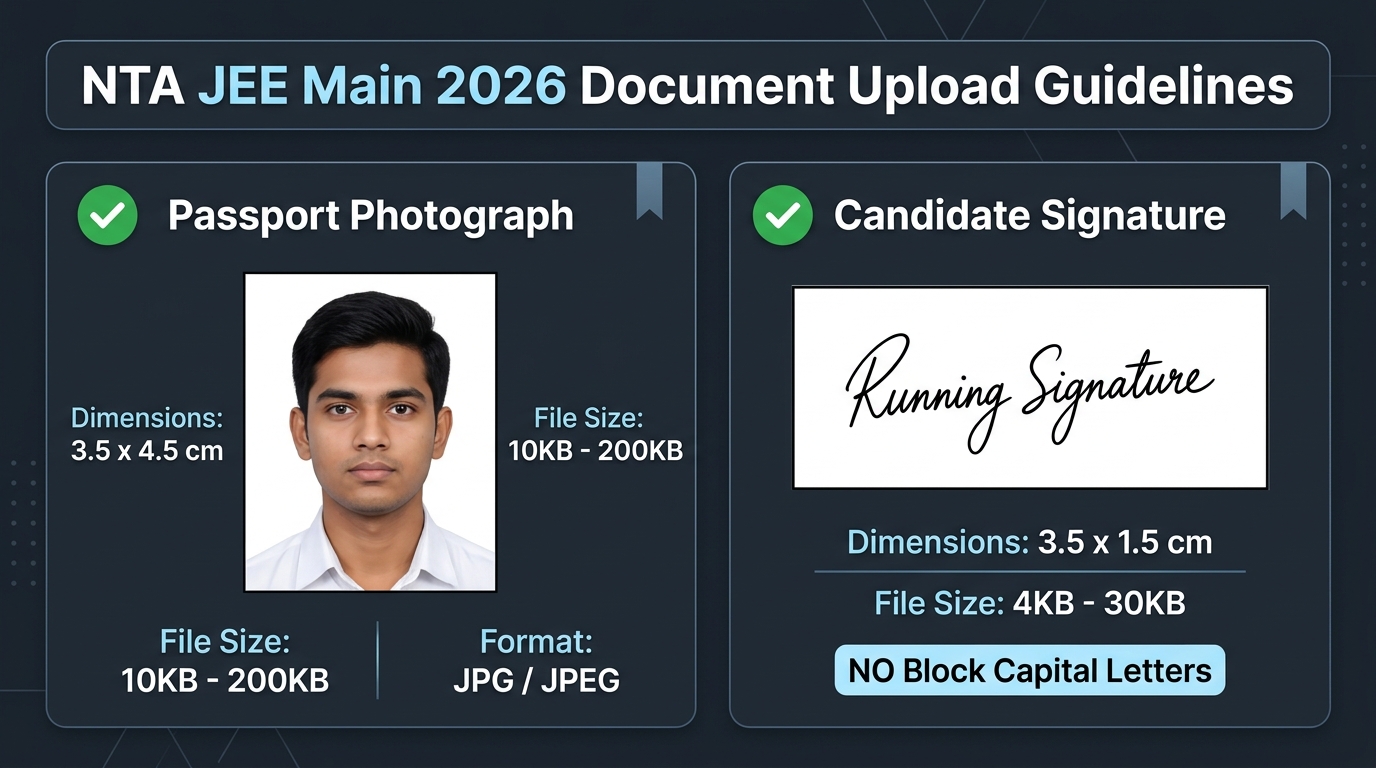
Official NTA JEE Main 2026 Document Upload Specifications
Over the past decade of assisting engineering aspirants through Joint Entrance Examination cycles for NTA, one recurring frustration stands out: brilliant students spend two solid years mastering rotational dynamics and coordinate geometry, only to face anxiety-inducing portal errors when uploading their photo on jeemain.nta.ac.in.
The NTA application portal enforces automated server-side header and dimension validation. If your image dimensions are disproportionate, or if your file size deviates by even 0.1 KB outside the permitted envelope, the gateway rejects the payload instantly. Review the confirmed technical benchmarks mandated by the official NTA Information Bulletin below:
| Document Type | Metric Dimensions | Pixel Size (150 / 300 DPI) | Strict File Size | Format & Background |
|---|---|---|---|---|
| Passport Photograph | 3.5 cm × 4.5 cm | 207 × 264 px (150 DPI) 413 × 531 px (300 DPI) | 10.0 KB – 200.0 KB | JPG/JPEG, Plain white background, 80% face coverage. |
| Candidate Signature | 3.5 cm × 1.5 cm | 207 × 89 px (150 DPI) 413 × 177 px (300 DPI) | 4.0 KB – 30.0 KB | JPG/JPEG, Black ballpoint pen, running cursive handwriting. |
| PwD / Category Certificate | Standard A4 page | Clear, legible scan | 50.0 KB – 300.0 KB | PDF format only, official state/central authority seal visible. |
Why NTA Rejects Photos and Signatures (Common Traps to Avoid)
When candidates encounter rejections during form scrutiny or admit card issuance, the issue almost never stems from server downtime. It happens because applicants make one of four subtle formatting mistakes that trigger NTA's automated screening filters:
1. The 80% Face Area and Shadowless White Background Rule
The National Testing Agency utilizes automated facial recognition software to match your registration photo against the live webcam photograph captured at your CBT exam center. For this algorithm to succeed, your face—measured from the hairline to the tip of your chin—must occupy at least 80% of the vertical canvas.
Casual smartphone portraits taken against bedroom curtains, outdoor foliage, or off-white textured walls cast micro-shadows behind the ears. The NTA portal's contrast analyzer flags these shadows as background noise. Always position yourself facing an indirect daylight window against a clean white wall or use our guide to create a pure white background.
2. The Minimum 4 KB Signature Boundary Trap
While the maximum limit for signatures is 30 KB (or 50 KB in some regional sessions), candidates frequently fall into the minimum file size trap. If you crop your signature closely on a smartphone and apply extreme compression, the resulting file often drops to 2.5 KB or 3.8 KB.
The NTA upload servlet immediately rejects files under 4.0 KB with the error: "Signature file size must be between 4 KB and 30 KB". Why? Below 4 KB, stroke edges suffer severe JPEG quantization noise, making the signature illegible for human biometric invigilators. Always aim for a sweet spot between 12 KB and 25 KB using our signature resizer tool.
3. The Block Capital Letter Disqualification
A critical instruction in paragraph 5.2 of the JEE Main Information Bulletin states that signatures written in capital block letters (such as "ROHAN GUPTA") are considered unauthentic and cause immediate rejection. Your signature must be written in normal running cursive script, exactly as you intend to sign on the physical attendance sheet at the test center.
4. NTA File Naming Glitch
The NTA registration portal uses strict regular expression checks on file names during multipart HTTP uploads. If your file is named IMG_20261022_WA0023(1).jpeg or contains spaces and special characters like parentheses, hyphens, or underscores, the upload script crashes silently or returns a generic error. Rename your files simply to Photograph.jpg and Signature.jpg before selecting them in your file picker.
How to Fix NTA Upload Errors on jeemain.nta.ac.in
If you are staring at a red error prompt on the candidate registration dashboard, find your exact error message in the troubleshooting matrix below:
| Observed Portal Error | Root Technical Cause | Exact Actionable Fix |
|---|---|---|
| "File size must be between 10 KB and 200 KB" | Original raw camera photo exceeds 200 KB or over-compressed below 10 KB. | Upload to our JEE Main Resizer and set target quality to generate a file between 40 KB and 90 KB. |
| "Signature file size outside specified limits" | Signature file is smaller than 4.0 KB or larger than 30.0 KB. | Adjust the slider in our tool to 15 KB. Ensure canvas is exactly 3.5 × 1.5 cm. |
| "Image dimensions do not match specified aspect ratio" | Photo uploaded as square (1:1) or wide landscape instead of 3.5:4.5 passport aspect ratio. | Crop your photo with our preset box (207×264 px). Avoid manual pinch-zooming without fixed aspect locks. |
| "Invalid File Name or Extension" | File contains spaces, emojis, or unsupported format (.png, .webp, .heic). | Convert to standard .jpg and rename file to Photograph.jpg. |
| "Server error / Session expired during upload" | Slow mobile connection timed out during heavy file transfer. | Compress both files below 80 KB so the HTTP payload uploads in under 2 seconds. |
Step-by-Step Walkthrough to Resize JEE Main Documents in 30 Seconds
You do not need Adobe Photoshop or a trip to a cyber cafe. You can format both files directly in your phone browser with full data privacy:
- Capture in Good Light: Take a photo of yourself standing against a white wall in natural indirect sunlight. Ensure both ears are visible, look straight into the camera lens with a neutral expression, and avoid wearing spectacles or caps.
- Sign Clearly on White Paper: Take a clean sheet of unruled white paper. Draw a light pencil rectangle approximately 3.5 cm × 1.5 cm, sign inside it with a black ballpoint pen using running cursive script, and photograph it straight from above.
- Open the Resizer Tool: Visit our dedicated JEE Main Photo & Signature Resizer on your phone or computer.
- Upload and Auto-Crop Photo: Drag and drop your passport portrait into the Photo module. The interactive crop canvas automatically locks the official 3.5 × 4.5 cm (207 × 264 px) aspect ratio. Align your head so your face occupies 80% of the box.
- Download Compliant Files: Target 50 KB for the photo (well inside 10–200 KB) and 15 KB for the signature (well inside 4–30 KB). Click "Download". All compression runs locally in your browser memory—no personal images are ever transmitted to our servers.
- Upload on NTA Portal: Log in to jeemain.nta.ac.in, navigate to the Document Upload step, select your newly formatted files, and verify the live preview before hitting Submit.
Exam Day Checklist: Document Verification & Attendance Rules
Formatting your files correctly for the online application is only the first step. NTA conducts strict physical verification on exam day. Keep these crucial points in mind:
- Print 6–8 Identical Passport Photos: You must carry at least 2 physical copies of the identical photograph uploaded in your online application form to paste on the center attendance sheet in front of the invigilator. Print 6 to 8 copies now to last through Session 1, Session 2, and JoSAA counselling.
- Admit Card Photo Box: Paste your passport photograph firmly in the designated box on page 1 of your printed JEE Main admit card prior to arriving at the exam center. Do not sign across the photo beforehand; you will sign in the presence of the invigilator.
- Left Hand Thumb Impression: Place your left thumb impression clearly in the candidate box on the admit card before reaching the exam venue using blue or black ink.
- Original Government Photo ID: Bring your physical, non-laminated Aadhaar Card (with updated childhood photo), Voter ID, Passport, or Class 12 School ID. Scanned copies on phones are strictly disallowed.
Ready to Format Your JEE Main 2026 Documents?
Resize your passport photo to 10KB–200KB and candidate signature to 4KB–30KB instantly. 100% private in-browser compression with zero server uploads.
Frequently Asked Questions
What are the exact photo specifications for NTA JEE Main 2026?▾
The National Testing Agency mandates a recent color passport photograph measuring 3.5 cm × 4.5 cm (approximately 207 × 264 pixels at 150 DPI or 413 × 531 pixels at 300 DPI). The file size must strictly remain between 10.0 KB and 200.0 KB in JPG or JPEG format, with 80% face visibility against a solid white background.
What are the exact dimensions and file size limits for the JEE Main signature?▾
The JEE Main candidate signature must measure 3.5 cm × 1.5 cm (approximately 207 × 89 pixels at 150 DPI or 413 × 177 pixels at 300 DPI). The file size must strictly remain between 4.0 KB and 30.0 KB in JPG or JPEG format, signed in black or dark blue ink.
How do I fix the 'File size must be between 10 KB and 200 KB' error on jeemain.nta.ac.in?▾
This error triggers when your photo image is either uncompressed (exceeding 200 KB) or over-compressed below 10.0 KB. Use our free in-browser JEE Main Photo Resizer to crop your image to 3.5 × 4.5 cm and compress the file safely between 40 KB and 90 KB.
Can I upload a signature written in capital block letters for JEE Main?▾
No. The NTA Information Bulletin strictly prohibits signatures in full capital or block letters (e.g., 'AMIT KUMAR'). Candidates must sign in their natural, continuous cursive running handwriting on unruled white paper.
What is the 80% face coverage rule and why does NTA reject selfies?▾
NTA's automated facial recognition system requires your face—from the top of the forehead to the bottom of the chin, including both ears—to occupy at least 80% of the photograph. Casual selfies, tilted angles, dark backgrounds, or photos showing wide torso views fail the biometric scan and risk application rejection.
What should I name my photo and signature files before uploading on NTA?▾
Save your photograph file as 'Photograph.jpg' and your signature as 'Signature.jpg'. Avoid spaces, special characters (like '@', '#', '$'), or long phone screenshot timestamps, which frequently cause HTTP upload errors on the NTA registration portal.