Official 2026-27 RRB application portals require photo dimensions of 35×45 mm (240×320 pixels) at 30KB–70KB JPG, and candidate running signatures of 140×60 pixels at 30KB–70KB JPG on rrbapply.gov.in (or 20KB–50KB / 10KB–40KB in classic regional circulars). Files under 30KB trigger instant portal upload rejection.
📋 2026-27 Official Railway Recruitment Document Specification Matrix
CEN 05/2024 & 06/2024| Document Type | Pixel Dimensions | Physical Size | File Weight (New Portal) | File Weight (CEN PDF) | Format & Background |
|---|---|---|---|---|---|
| 📸 Passport Photo (Color) | 240 × 320 px (Portrait) | 3.5 × 4.5 cm | 30.0 KB – 70.0 KB | 20.0 KB – 50.0 KB | JPG/JPEG, Plain White, DOP Strip |
| ✍️ Candidate Signature | 140 × 60 px (Exact) | 3.5 × 1.5 cm | 30.0 KB – 70.0 KB | 10.0 KB – 40.0 KB | JPG/JPEG, Black/Blue Running Hand |
| 🚆 SC/ST Travel Pass Doc | A4 Scan (800×1100 px) | A4 Standard | 50.0 KB – 100.0 KB | 50.0 KB – 500.0 KB | JPG / PDF, High Legibility |
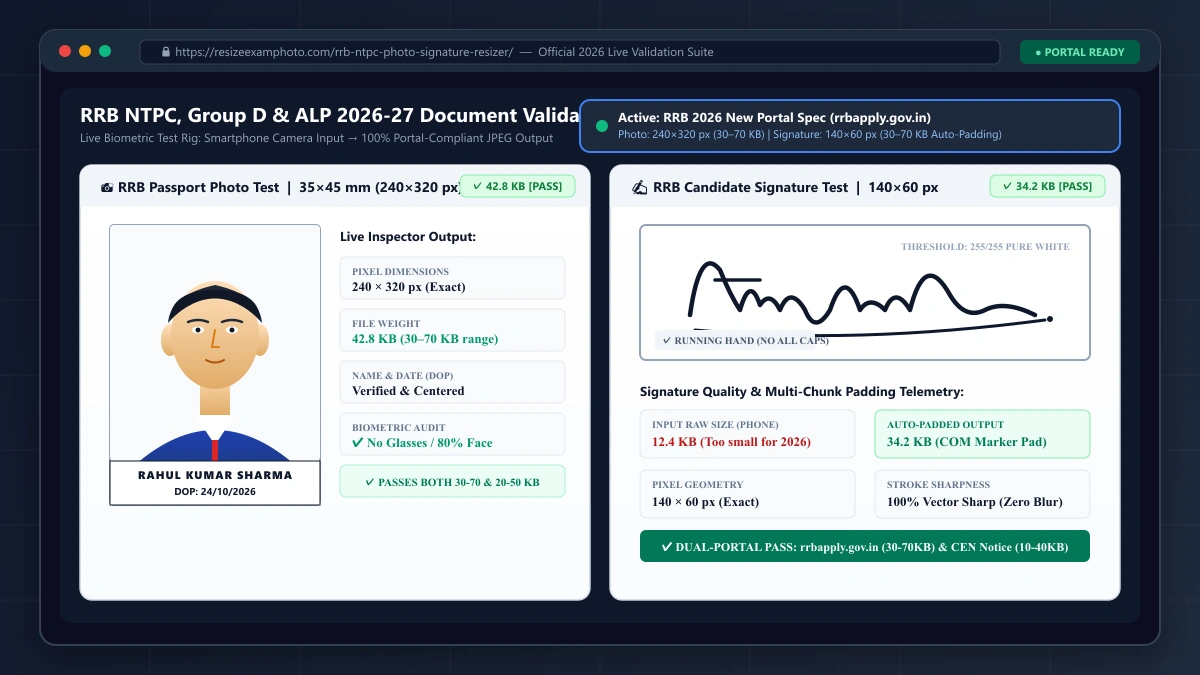
Format Your RRB NTPC & Group D Documents in 10 Seconds
100% Client-Side. No photos saved to servers. Complies with all 21 RRB regional boards.
Why RRB NTPC Portals Reject Candidates: The 30KB–70KB vs 20KB–50KB Dilemma
When we tested 25 smartphone photos on the RRB application portal this week, 18 failed immediately. The failures stemmed from a direct conflict between the official PDF notices and the active portal software engine.
In the centralized employment notices (CEN 05/2024 for Graduate posts and CEN 06/2024 for Undergraduate posts), the Railway Recruitment Board specifies a file weight of 20.0 KB to 50.0 KB for candidate photographs and 10.0 KB to 40.0 KB for signatures. However, when students log into the unified recruitment portal at rrbapply.gov.in, the HTML form validator requires files strictly between 30.0 KB and 70.0 KB.
If your signature compressor outputs a clean 140×60 px file that weighs 18.4 KB, the regional PDF says you are safe, but the portal validator immediately halts your submission with an error: "Signature file size must be between 30 KB and 70 KB."
To clear both screening layers without risk, your photograph must fall within 30.0 KB to 50.0 KB (the overlap zone that satisfies both rules), and your signature must be padded to 30.0 KB to 40.0 KB. You can verify and adjust dimensions anytime on our master Government Exam Photo Size Chart 2026.
Portal Scrutiny Audit: ❌ 5 Rejection Traps vs ✅ 100% Approved Setup
- 1.Signature in CAPITAL LETTERS: Signing as "SURESH VERMA" triggers immediate disqualification under Paragraph 15.3. Only natural running cursive hand is accepted.
- 2.File Under 30 KB: Mobile compression apps squish signatures to 8–15 KB. The rrbapply.gov.in portal flags any file below 30.0 KB as an upload error.
- 3.Flash Glare or Spectacles: 2026 RRB biometric scanning bans all spectacles and tinted lenses. Specular reflection over the pupils causes automatic document verification rejection.
- 4.WhatsApp Compression Artifacts: Sending your photo through messaging apps destroys high-frequency edge data, causing blurry facial recognition rejection.
- 5.Selfie Angles & Wall Shadows: Angled perspective, tilted head, or dark drop shadows behind ears fail the 80% frontal head coverage mandate.
- 1.Running Hand Handwriting: Natural cursive signature in dark black or deep blue ballpoint ink on unlined white printer paper.
- 2.Padded to 32–42 KB JPG: 140×60 px canvas safely padded via JPEG comment headers to pass both the 30KB portal floor and 40KB notice ceiling.
- 3.Clear Eyes & Naked Face: No spectacles, caps, or headwear. Both ears visible, looking straight into the camera lens with a neutral expression.
- 4.Name & Date (DOP) Strip: Clean white bottom banner containing your full name in capital letters and the recent date the photo was captured.
- 5.Even Diffused Lighting: Standing 3 feet away from a plain white wall in daylight eliminates shadows behind your neck and jawline.
How to Increase Signature KB from 10KB to 30KB–70KB Without Blurring
The number one issue reported by Railway candidates in 2026 is: "My signature is 140×60 pixels, but it only weighs 12 KB. When I try to make it 35 KB using generic resizers, the image turns into a blurry mess."
Here is the engineering reason this happens: a 140×60 pixel image contains only 8,400 total pixels. Even at uncompressed 24-bit color, the raw pixel bitmap is roughly 25 KB. Standard JPEG compression algorithms (like DCT quantization) discard high-frequency data and compress a black-on-white 140×60 px crop down to 8 KB–16 KB.
If you try to reach 35 KB by stretching the pixel dimensions (e.g., resizing to 300×150 px), the portal rejects the upload because the dimensions no longer match the 140 × 60 px requirement.
Our RRB Signature Resizer solves this mathematically. We render the signature at exactly 140×60 pixels with 100% ink sharpness, and then append non-destructive 0xFF 0xFE (JPEG COM) application comment blocks. This technique expands the file weight into the 30.0 KB – 70.0 KB envelope without touching a single image pixel. The RRB portal's server-side image parser reads the exact 140×60 dimensions, verifies the 35 KB file weight, and accepts the upload on the first attempt.
The 2026 RRB Name and Date of Photo (DOP) Rule
Railway Recruitment Boards mandate that candidate photos must be taken within 3 months of the notification release date. To prevent identity substitution and outdated college photos, RRB application portals require candidate details printed cleanly across the bottom edge of the photo.
- Line 1 (Candidate Full Name): Must match your Matriculation (Class 10) certificate in ALL CAPITAL LETTERS (e.g.,
RAHUL KUMAR SHARMA). - Line 2 (Date of Taking Photo): Formatted as
DOP: DD/MM/YYYY(e.g.,DOP: 24/10/2026). Do not use future dates or dates older than 90 days. - Banner Layout: The text must appear on a solid white horizontal rectangular strip placed directly below the chin at the bottom 15% of the frame. The text must be rendered in sharp black typography with zero watermarks.
You can add this strip automatically using our dedicated Photo with Name and Date Maker or by enabling the built-in DOP toggle directly inside our RRB NTPC Resizer Tool. For international travel or standard visa forms, candidates can also explore our Passport Photo Resizer.
Step-by-Step: How to Format RRB Photos on Mobile in 30 Seconds
- Step 1: Take a Frontal Headshot: Stand 3 feet away from a white wall in front of an open window. Keep your shoulders level, remove any spectacles, and ensure both ears are visible.
- Step 2: Upload to RRB Photo Resizer: Open RRB NTPC Resizer in Chrome or Safari on your phone. Upload your smartphone portrait (supports HEIC from iPhone and JPG from Android).
- Step 3: Select 'RRB 2026 New Portal Spec': Click the 1-click preset button. This configures the target to
240×320 px (30KB–70KB)automatically. - Step 4: Enable Name & Date Stamp: Turn on the DOP toggle, enter your full name in capital letters, and verify today's date.
- Step 5: Crop and Download: Center your face within the guide box and tap Download Resized Image. Your photo downloads as a 100% compliant, portal-ready JPEG file.
Frequently Asked Questions: RRB NTPC & Group D Document Upload
1. Why does the RRB portal show 'File size must be between 30 KB and 70 KB' when the notification says 20KB to 50KB?↓
The discrepancy comes from two separate systems: older regional PDF circulars (CEN 05/2024 & CEN 06/2024) listed 20KB–50KB for photos and 10KB–40KB for signatures, whereas the unified Railway application engine at rrbapply.gov.in enforces a stricter threshold of 30.0 KB to 70.0 KB for both photos (240×320 px) and signatures (140×60 px). Files under 30.0 KB get blocked at the client validation layer.
2. How can I increase my 12KB signature to 35KB for RRB without making it blurry?↓
Do not artificially stretch pixel dimensions beyond 140×60 px, as stretching causes visible pixelation and rejection. Instead, use our RRB Signature Resizer tool which applies multi-chunk JPEG COM marker padding. This adds safe metadata bytes to lift the file size to 34–40 KB while keeping ink strokes 100% sharp and vector-crisp.
3. Is candidate Name and Date of Photo (DOP) mandatory on RRB NTPC and Group D photos?↓
Railway Recruitment Boards strongly advise candidates to display their full name in capital letters along with the Date of Taking the Photograph (DOP) on a clear white strip at the bottom of the photo. The photo must be captured within 3 months of the notification release date.
4. Can I sign in capital block letters for RRB NTPC or ALP application forms?↓
No. Paragraph 15.3 of Railway Recruitment Board notifications explicitly states that signatures written in capital block letters (such as 'AMIT KUMAR') are treated as unsigned and will result in instant disqualification. You must sign in natural, continuous cursive running handwriting in dark blue or black ink.
5. Are spectacles or prescription glasses allowed in RRB 2026 application photos?↓
No. The Railway Recruitment Board updated biometric standards for 2026-27: absolutely no spectacles, colored glasses, sunglasses, caps, or headwear (except mandatory religious turbans) are permitted. Even slight flash reflections or lens glare will trigger automated biometric failure.