To format your application documents for the Railway Recruitment Board portal (rrbapply.gov.in), capture your live photo against a solid white wall without spectacles, and use our free RRB NTPC Resizer to format your signature to 140×60 px and strictly 30 KB to 50 KB in black running ink.
Format Official RRB NTPC Photo & Sign in 30 Seconds
Locks candidate photo to 240×320 px (30KB–70KB) and signature to 140×60 px without blur.
- Signature Size Trap: Railway exams reject 10KB–20KB files. Your signature file size must strictly stay between 30.0 KB and 50.0 KB in JPEG format.
- Live Photo Requirements: Maintain 40–60 cm distance facing natural light; remove all glasses, caps, and face coverings against a shadowless white wall.
- Handwriting Style Mandate: Sign in running cursive handwriting using black ballpoint ink. Block capital letters trigger instant disqualification.
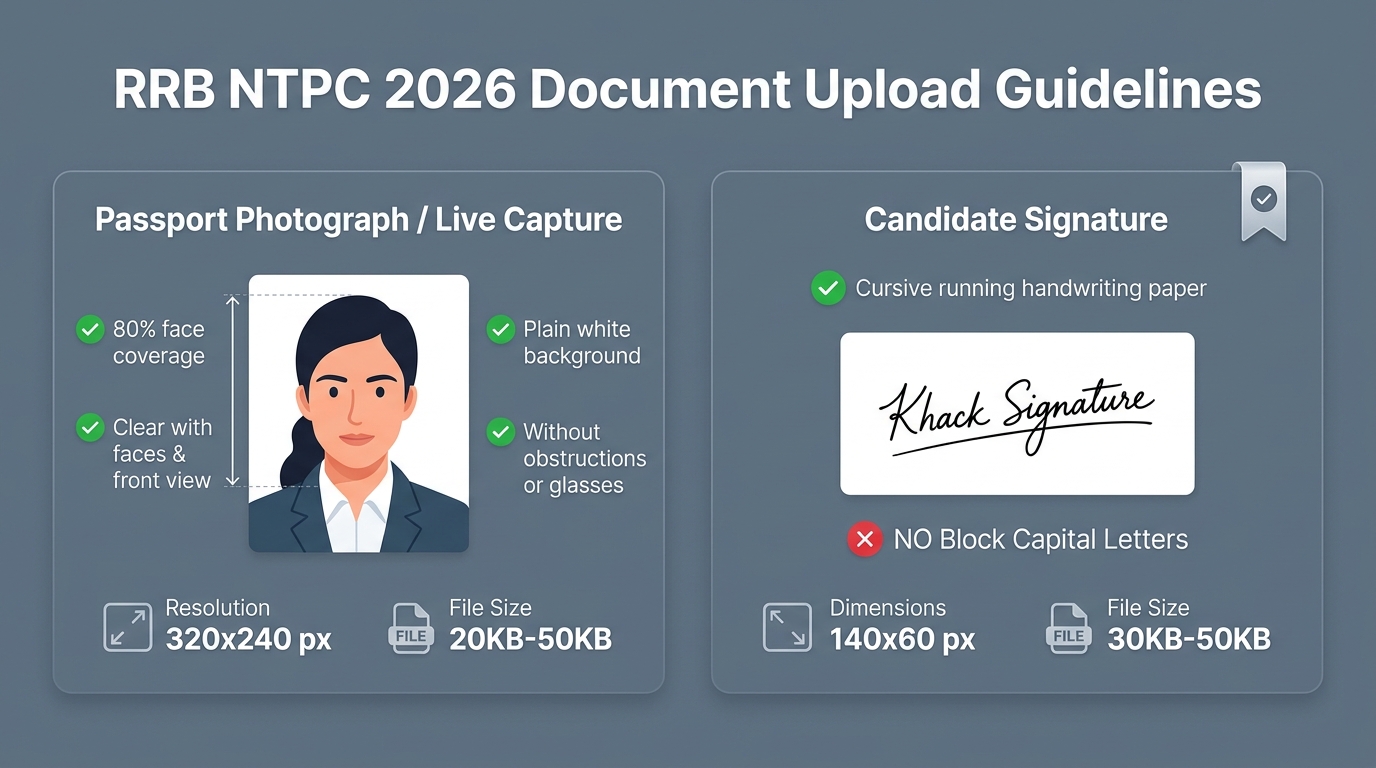
RRB NTPC 2026 Official Photo & Signature Specifications
The Railway Recruitment Board processes over 1.2 crore applicants across Graduate (CEN 05/2024, 8,113 vacancies) and Undergraduate (CEN 06/2024, 3,445 vacancies) recruitment cycles. To eliminate proxy candidates, RRB centralized all registrations through the unified rrbapply.gov.in portal with automated biometric validation.
Submitting files that breach exact pixel coordinates or byte boundaries causes automated server rejection. Below are the confirmed technical benchmarks mandated by the official Railway recruitment directorate:
| Document Type | Pixel Dimensions | File Size Range | Mandatory Rules |
|---|---|---|---|
| Passport Photo (Live / Static) | 240 × 320 pixels (3:4 ratio) | 20.0 KB – 50.0 KB | Solid white background, 80% face coverage, no glasses or hats. |
| Candidate Signature | 140 × 60 pixels (7:3 ratio) | 30.0 KB – 50.0 KB | Black ballpoint ink, running handwriting, unruled white sheet. |
| SC/ST Community Certificate | Standard A4 / Letter format | 50.0 KB – 500.0 KB | Clean PDF scan for free railway travel pass authority. |
Why RRB Rejects Signatures Under 30KB (The Critical Difference)
The most frequent reason candidates fail to submit their Railway application is the minimum signature file size trap. Most Indian competitive examinations—including SSC CGL, CHSL, and IBPS PO—standardize signatures between 10 KB and 20 KB.
Candidates who re-use their SSC signature file on the Railway portal receive an immediate error prompt: "Signature file size must be between 30 KB and 50 KB". RRB application gateways run aggressive optical character analysis on signatures to verify continuous ink flow during document verification (DV). If your file is compressed under 30.0 KB, algorithmic detail loss occurs, causing the validation check to fail.
Furthermore, signatures executed in CAPITAL or BLOCK letters (e.g., "RAHUL SHARMA" instead of a running cursive signature) violate paragraph 15.3 of the Centralised Employment Notice, resulting in direct application rejection without refund.
How to Fix Live Photo Capture Errors on rrbapply.gov.in
The updated Railway Recruitment portal utilizes client-side WebRTC camera integration for live candidate photo verification. If you experience camera freezing, black viewports, or face detection errors, implement these technical adjustments:
| Observed Portal Error | Root Technical Cause | Exact Actionable Fix |
|---|---|---|
| "Camera not allowed / Permission denied" | Chrome browser site settings block media stream access. | Click the tune icon left of URL → Permissions → set Camera to "Allow" → refresh tab. |
| "Face boundary not aligned" | Candidate seated too close or head tilted beyond angular tolerance. | Sit exactly arm's length (45–60 cm) away so both ears align inside the on-screen oval guide. |
| "High reflection detected / Glare" | Eyeglass lens reflections or harsh overhead bulb flare. | Remove power glasses and spectacles completely. Illuminate face from the front using indirect natural light. |
| "Blank camera stream on desktop" | Low-resolution external webcam or video driver lock by another program. | Close Zoom and Teams in Task Manager, or log in via mobile Chrome to capture via phone camera. |
Step-by-Step Guide to Resize RRB NTPC Signature in 30 Seconds
To ensure your scanned signature passes the strict 30 KB to 50 KB requirement on your first attempt without blurry text or pixel distortion, follow these simple steps:
- Sign on White Paper: Take a fresh sheet of unruled white paper and write your normal cursive signature using a dark black ballpoint pen.
- Capture in Good Light: Take a photo with your smartphone directly above the signature to avoid oblique angle distortion and harsh shadows.
- Open the Resizer: Visit our free RRB NTPC Photo & Signature Resizer or RRB ALP Resizer in your browser.
- Upload and Set Target: Drag your signature photo into the tool canvas. The tool automatically applies the official 140 × 60 pixel canvas boundary.
- Set File Size Slider to 35 KB: Target between 35 KB and 45 KB to stay safely within the 30.0 KB – 50.0 KB zone.
- Download Compliant JPEG: Click "Download Resized Image". All compression executes client-side inside your browser with 100% data privacy.
Document Verification Checklist for Railway Applicants
When reporting to your allotted Railway Recruitment Board center for Document Verification (DV) following CBT-1 and CBT-2, officials cross-examine physical documents against your uploaded application files. Ensure you preserve:
- 12 Physical Color Passport Copies: Keep at least 12 physical passport photos matching the exact appearance (beard, hairstyle) captured during online live registration.
- Original SC/ST Travel Pass Certificate: If you claimed free rail travel, you must present the original caste certificate uploaded during registration.
- Signature Uniformity: The signature executed on your CBT-1 attendance sheet, CBT-2 answer booklet, and DV ledger must match your uploaded digital file stroke-for-stroke.
- Valid Government Photo ID: Bring original Aadhaar Card (biometrically unlocked), PAN Card, Voter ID, or Passport.
Need to Format Your RRB NTPC Documents Now?
Resize your signature to 30KB–50KB and passport photo to 20KB–50KB instantly. 100% private in-browser compression with zero server uploads.
Frequently Asked Questions
What are the exact photo specifications for RRB NTPC 2026?+
For static uploads or system requirements, the RRB NTPC photograph must measure 240 × 320 pixels (width 240 px, height 320 px / 3.5 cm × 4.5 cm) with a file size strictly between 30.0 KB and 70.0 KB (or 20–50 KB in classic circulars) in JPEG/JPG format. For live capture on rrbapply.gov.in, candidates must sit 40–60 cm from the camera against a plain white wall with 80% face coverage and zero spectacles.
Why does RRB reject signatures compressed to 10KB to 20KB?+
Unlike SSC and UPSC which require 10KB–20KB, Railway Recruitment Boards (CEN 05/2024 & CEN 06/2024) enforce a higher minimum threshold of 30.0 KB to 50.0 KB (or 10KB–40KB depending on regional notifications). Files under 30 KB are rejected with the error 'Signature file size outside specified limits'.
Can I sign in capital block letters on the RRB NTPC form?+
No. RRB Centralised Employment Notifications strictly prohibit signatures written in capital or block letters. Candidates must sign in continuous cursive running handwriting using black ballpoint ink on clean white unruled paper.
How do I fix the 'Camera not detected' error on rrbapply.gov.in?+
Click the padlock or settings icon in your browser URL bar, set Camera access to 'Allow', close background video applications such as Teams, Zoom, or WhatsApp, and reload the application tab.
What are the SC/ST travel pass certificate upload rules for RRB?+
Eligible SC/ST candidates claiming free railway travel authority must upload a clear scanned PDF copy of their community certificate. The file size must strictly remain under 500 KB (50 KB to 500 KB) with all state seals and signatures legible.