To format your application documents for the Staff Selection Commission portal (ssc.gov.in), capture your live webcam photo against a shadowless white wall, and use our free SSC GD Signature Resizer to format your signature strictly to 6.0×2.0 cm and 10.0 KB to 20.0 KB in 30 seconds.
- Official Signature Boundaries: Must measure 6.0 cm × 2.0 cm (approx 140×60 px), file size strictly 10.0 KB to 20.0 KB in JPG/JPEG, signed in continuous cursive running hand.
- Live Photo Capture Mandate: No pre-saved photo upload. Capture live on
ssc.gov.inor via the "My SSC" app with 80% face coverage, zero spectacles, and no background shadows. - The Miniature Signature Trap: The signature must occupy at least 80% of the cropped box. Tiny signatures surrounded by wide white margins trigger automated rejection.
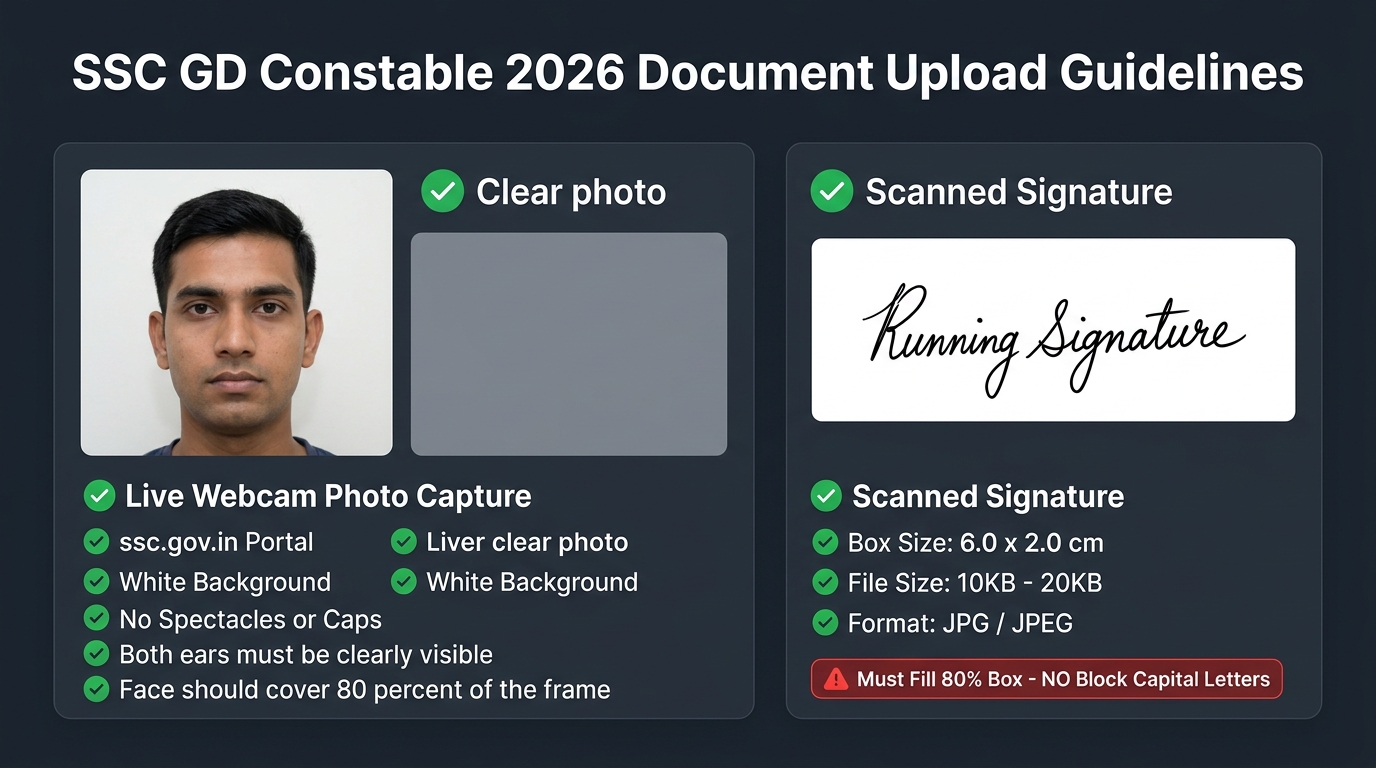
Official SSC GD Constable 2026 Document Upload Specifications
The Staff Selection Commission conducts the General Duty (GD) Constable examination across Central Armed Police Forces (BSF, CISF, CRPF, SSB, ITBP, AR, and SSF). With over 45 to 50 lakh candidates competing for more than 39,000 vacancies, the commission enforces strict automated pre-screening on ssc.gov.in to weed out proxy applicants and substandard submissions.
Unlike previous recruitment years where candidates uploaded pre-edited passport photographs, the updated SSC technological framework utilizes a dual-mechanism system: live biometric WebRTC facial capture combined with a standalone scanned signature upload. Review the exact official benchmarks mandated by the Staff Selection Commission below:
| Document Type | Upload Mechanism | Dimensions / Box | File Size Boundary | Mandatory Rules |
|---|---|---|---|---|
| Live Candidate Photo | Live Webcam / Phone Camera | On-screen oval guide (80% face area) | Auto-compressed by portal | Plain white wall, no glasses, no caps, both ears visible, neutral face. |
| Candidate Signature | Digital Scanned File Upload | 6.0 cm × 2.0 cm (140 × 60 px approx) | 10.0 KB – 20.0 KB | JPG/JPEG format, black or dark blue ink, running cursive handwriting. |
| Post-Written Physical Photos | Physical Hard Copies | 3.5 cm × 4.5 cm passport size | 10 to 12 physical prints | Matching appearance for PST/PET and Medical Examination (DME). |
Why SSC Rejects GD Constable Documents (The 4 Fatal Traps)
Every year, tens of thousands of earnest candidates discover that their application status reads "Rejected during Scrutiny". These rejections do not happen because of server glitches; they happen because applicants unknowingly breach one of four strict Commission guidelines:
1. The "Miniature Signature" Disqualification Trap
The single most common mistake on SSC GD forms is uploading a signature that appears tiny inside a large white canvas. When candidates take a picture of an A4 sheet with their phone camera and crop loosely, the actual handwritten strokes might occupy only 20% of the 140×60 pixel box.
When the SSC automated optical binarization algorithm processes the file, the thin ink strokes disintegrate into pixel noise. Paragraph 10.2 of the notification mandates: draw a rectangular box of 6.0 cm width by 2.0 cm height on clean unruled paper, sign inside it, and crop tightly so that your signature occupies at least 80% of the bounding area.
2. The Strict 10.0 KB to 20.0 KB Byte Boundary
Unlike state-level recruitment portals that accept signatures up to 50 KB or 100 KB, SSC enforces a rigid, non-negotiable window: strictly 10.0 KB to 20.0 KB.
If your file is 9.9 KB, the server returns "File size must be between 10 KB and 20 KB". If your file is 20.1 KB, the upload fails immediately. Many candidates try to compress images using random ad-supported websites that drop the quality to 5 KB, making the file unacceptable. Our dedicated 10KB–20KB Signature Resizer uses an in-browser binary search compression algorithm to land your file precisely between 14.0 KB and 18.0 KB without any loss of stroke definition.
3. The Block Capital Letter Disqualification
Writing your name in capital block letters (such as "SURESH VERMA" or "ANIL SINGH") is explicitly prohibited. Under Indian legal jurisprudence and SSC operational rules, a signature must represent an individual's idiosyncratic cursive script. Block-letter signatures are treated as untrusted text strings and result in summary disqualification with zero right of appeal.
4. Live Webcam Capture Pitfalls on ssc.gov.in
The Commission replaced static photo uploads with live webcam capture to stop impersonation. However, candidates frequently fail the automated live face recognition check due to:
- Backlit Glare: Sitting with a window or bright light bulb behind you makes your face appear in deep silhouette. Light must fall directly on the front of your face.
- Spectacles & Power Glasses: Even transparent clear glasses cause lens reflections that obscure the pupil coordinates, triggering an automated rejection. Remove all glasses before clicking capture.
- Textured or Dark Backgrounds: Standing in front of patterned curtains, almirahs, or brick walls confuses the background segmentation software. Sit directly against a plain white wall or use our guide to create a white background.
How to Fix Common Upload & Camera Errors on ssc.gov.in
If you are encountering errors on the candidate registration portal or the "My SSC" application, use the direct technical remedies listed in the matrix below:
| Observed Portal Error | Root Technical Cause | Exact Actionable Fix |
|---|---|---|
| "Signature file size must be between 10 KB and 20 KB" | File size is less than 10.0 KB or exceeds 20.0 KB. | Upload to our SSC GD Resizer, adjust target size to 15 KB, and re-download. |
| "Webcam not detected / Media stream access denied" | Browser security permissions blocking device camera stream. | Click padlock icon in browser URL bar → Site settings → set Camera to 'Allow' → reload tab. |
| "Face boundary not aligned inside oval frame" | Candidate sitting too close (under 30 cm) or tilting head sideways. | Position your eyes level with the camera at a distance of 50 cm so your chin and forehead fit inside the on-screen oval. |
| "Upload failed: Invalid file format or characters in filename" | Signature saved as PNG/WEBP or contains special characters like @,#,$,(). | Rename your file strictly to Signature.jpg and ensure it is in JPEG format. |
| "Live photo capture button disabled or grayed out" | Unstable internet connection or background WebRTC session conflict. | Close background video apps (Zoom, WhatsApp Web), clear browser cache, or complete capture on the official My SSC mobile app. |
Step-by-Step Walkthrough to Resize SSC GD Signature in 30 Seconds
You do not need to pay cyber cafe fees or struggle with complex desktop photo editing suites. You can format your signature with surgical accuracy on your smartphone or PC:
- Draw the 6×2 cm Bounding Box: Take a fresh, unruled white A4 paper. Using a ruler, draw a neat rectangle measuring approximately 6 cm in width by 2 cm in height.
- Sign with Dark Black or Blue Ink: Use a dark ballpoint pen to write your normal cursive signature. Ensure your signature expands horizontally to fill at least 80% of the box area without touching the borders.
- Photograph from Directly Above: Hold your phone parallel to the paper in daylight. Avoid oblique angles, casting hand shadows across the paper, or using camera flash.
- Open the Resizer: Launch our free SSC GD Constable Photo & Signature Resizer in your browser.
- Align and Set Size to 15 KB: Drop your signature photo onto the canvas. The tool locks the official 140 × 60 pixel boundary. Adjust the compression slider to target approximately 14 KB to 16 KB.
- Download Compliant JPEG: Click "Download Resized Image". All compression executes client-side inside your browser sandbox—your files are 100% private and never uploaded to any remote server.
PST, PET & Medical Examination (DME) Document Verification Checklist
Document verification for SSC GD Constable is conducted rigorously across Central Armed Police Force (CAPF) nodal centers during the Physical Standard Test (PST), Physical Efficiency Test (PET), and Detailed Medical Examination (DME). Ensure you prepare the following:
- 10 to 12 Physical Color Passport Copies: Even though the online form uses live capture, you must carry at least 10 physical passport photos matching your appearance (beard, facial features, hair) during registration.
- Signature Uniformity: The signature executed on your CBT examination attendance ledger, PST/PET clearance certificate, and DME dossier will be cross-checked stroke-by-stroke against your uploaded digital signature.
- Biometric Aadhaar Authentication: Ensure your Aadhaar biometric data (fingerprints and iris) is updated and unlocked via the mAadhaar portal prior to appearing at the CAPF recruitment camp.
- Original Category & Domicile Certificates: SC, ST, OBC, EWS certificates and State Domicile / Permanent Resident Certificates must strictly match the central government format prescribed in the notification annexures.
Ready to Format Your SSC GD Documents?
Resize your signature to 10KB–20KB and format your documents instantly. 100% private in-browser compression with zero server uploads.
Frequently Asked Questions
What are the exact photo specifications for SSC GD Constable 2026?▾
Under updated Staff Selection Commission guidelines on ssc.gov.in, candidates do not upload a pre-existing photo file. Instead, the portal captures a live photograph via webcam or smartphone camera. The candidate must sit straight against a plain white or light-colored background with 80% face coverage, both ears clearly visible, and without wearing spectacles, caps, or face masks.
What is the official signature size for the SSC GD application form?▾
The SSC GD candidate signature must be scanned and uploaded as a JPEG/JPG image with a file size strictly between 10.0 KB and 20.0 KB. The official recommended dimensions are 6.0 cm in width by 2.0 cm in height (approximately 140 × 60 pixels to 236 × 79 pixels at standard screen resolutions), signed in black or dark blue ink.
What is the 'Miniature Signature' error and why does SSC reject it?▾
SSC automated scrutiny and CAPF medical boards reject signatures where the actual ink strokes occupy less than 80% of the uploaded image canvas. If you take a wide photo of a piece of paper with a tiny signature in the center, the automated scanner marks it as illegible or miniature, resulting in immediate form cancellation.
Can I sign in capital block letters on my SSC GD application?▾
No. Paragraph 10.2 of the official SSC GD notification explicitly states that signatures written in capital letters or block letters (e.g., 'MANOJ KUMAR') will be summarily rejected without warning. Candidates must sign in their natural, continuous cursive running handwriting.
How do I fix the 'File size must be between 10.0 KB and 20.0 KB' error on ssc.gov.in?▾
This error occurs when your scanned signature file drops below 10.0 KB or exceeds 20.0 KB. Use our free, client-side SSC GD Signature Resizer to crop your signature to 6×2 cm and compress the file safely to 14 KB or 16 KB with 100% sharpness.
How do I fix webcam camera permission errors on ssc.gov.in?▾
Click the padlock or site settings icon on the left side of your browser URL bar, set 'Camera' permissions to 'Allow', close background video applications like WhatsApp or Teams, and refresh the portal page. Alternatively, use the official 'My SSC' Android app to capture your live photo using your phone camera.