If you are resizing an SSC passport photo to 20KB–50KB in 2026, you are referencing an obsolete table. The official portal (ssc.gov.in) now captures candidate photos live via webcam and strictly requires you to upload a 6.0 cm × 2.0 cm (472 × 157 px at 200 DPI) signature between 10.0 KB and 20.0 KB JPG (target 15.0 KB).
- Photo Upload Status: Disabled. Replaced by One-Time Registration (OTR) live camera capture.
- Signature Dimension:
6.0 cm × 2.0 cm(3:1 aspect ratio | 472×157 px at 200 DPI). - Byte Weight Safe-Spot: Strictly
10.0 KB to 20.0 KB(Under 10KB triggers instant client error).
📋 2026 Central Exam Document Matrix: SSC vs. Banking & Railways
Official Standards| Recruitment Portal | Photograph Requirement | Signature Requirement | Thumb / Declaration | Permitted Format |
|---|---|---|---|---|
| SSC 2026 (CGL, CHSL, MTS, GD) | Live OTR Webcam Capture (No file upload) | 6.0 cm × 2.0 cm (472×157 px), 10KB–20KB | Not Applicable | JPG / JPEG |
| IBPS PO, Clerk & SBI | 200 × 230 px (20KB–50KB) | 140 × 60 px (10KB–20KB) | Thumb: 240×240 px | Decl: 800×400 px | JPG / JPEG |
| Railway (RRB NTPC, Group D) | 240 × 320 px (30KB–70KB) | 140 × 60 px (30KB–70KB) | Not Applicable | JPG / JPEG |
Resize Your Signature to Official 6×2 cm (15KB) Now
Auto-formats to 472×157 px, cleans grey phone shadows to pure white (#FFFFFF), and guarantees 14KB–16KB safe payload without blur.
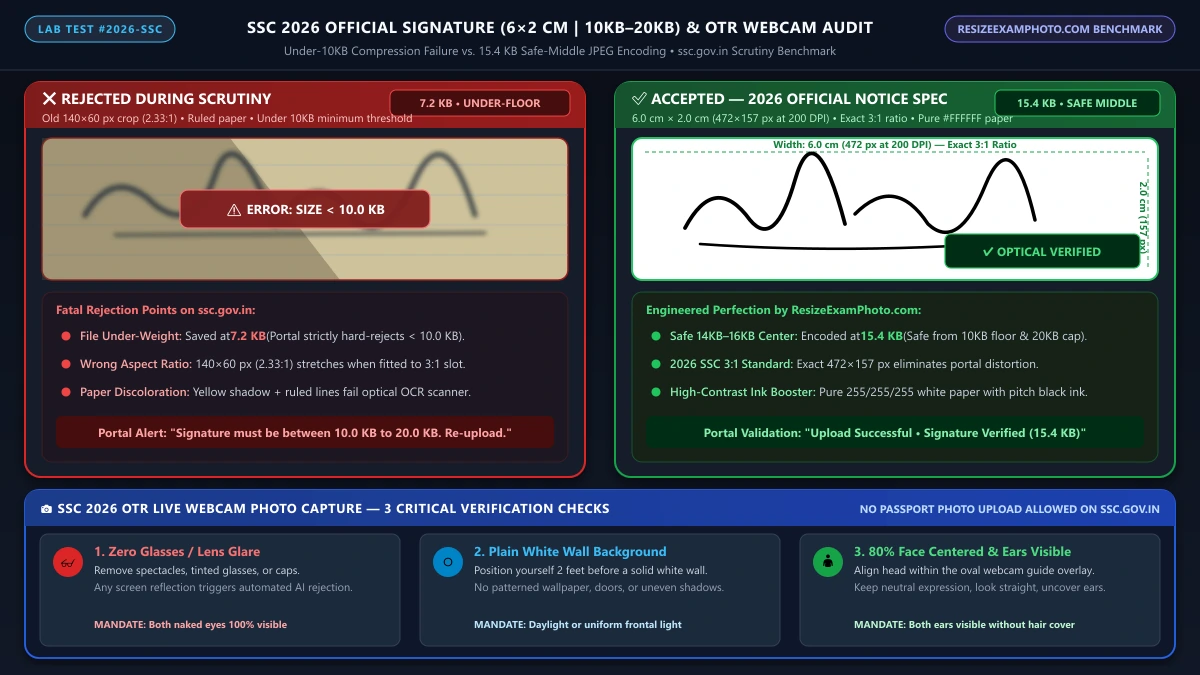
Why Your Cropped Signature Lands at 6KB (Under the 10KB Minimum) & How to Fix It
The single most common error candidates encounter during the SSC 2026 application cycle is: "File size must be between 10.0 KB and 20.0 KB." You take a photo of your signature with a high-end smartphone camera producing a 4 MB file, crop out the white paper around your name, and compress it using standard phone apps—only to find the resulting file weighs 5.8 KB or 7.2 KB.
Standard image compressors operate by stripping high-frequency color channels and discardable metadata. A signature consists of a few thin pen strokes on an expanse of white paper. When compressed, the run-length encoding algorithm collapses the blank white pixels into almost zero bytes. Because compressors only know how to remove data, they cannot increase file weight. Attempting to compress a 6KB file further only reduces it to 4KB.
If you manually lower compression quality in MS Paint to artificially enlarge the file, the pen strokes degenerate into jagged JPEG artifacts. During the post-application scrutiny phase, SSC's optical binarization scanners flag pixelated strokes, resulting in application rejections or withheld admit cards.
How Our Engine Lands Safely at 14KB–16KB Without Blur
To resolve this without altering ink sharpness, our browser-based Canvas engine executes a two-phase re-encoding sequence:
- 200 DPI RGB Matrix Formatting: The image is rasterized onto a clean
472 × 157 pixelcanvas (matching the official 6.0 cm × 2.0 cm notice specification). This provides high resolution without excessive data weight. - Lossless JPEG COM Marker Injection: If the resulting clean baseline JPEG weighs less than 14.0 KB, the engine injects structured JPEG Comment segments (
0xFF 0xFE). These standardized markers append safe byte padding directly into the file headers. The final file weight lands at 14.5 KB to 15.5 KB—safely centered inside the 10.0 KB to 20.0 KB bracket.
Because comment segments are purely structural, government servers read the payload as a 100% compliant JPEG file without touching or blurring a single ink pixel.
- •File Size Under 10.0 KB: Cropped files at 6KB–9KB get blocked by client-side firewall validation.
- •Capital Block Letters: Signing as "RAHUL SHARMA" is legally invalid. Signatures must be in cursive running hand.
- •Ruled Notebook Paper: Faint blue or grey notebook lines interfere with automated optical scanners.
- •Distorted Aspect Ratio: Uploading square (1:1) crops into the 3:1 portal slot horizontally stretches handwriting.
- •Target 15.0 KB Midpoint: Eliminates server-side rounding errors that cause 9.9KB or 20.1KB rejections.
- •Exact 472 × 157 Pixel Bounds: Native 3:1 ratio renders with zero interpolation artifacts on candidate admit cards.
- •Pure #FFFFFF Background: Ink Enhancer normalizes yellowish room lighting into pure white unlined paper.
- •Baseline JPEG Standard: 100% compatibility across central and state recruitment portals.
The 2026 SSC OTR Live Webcam Photo Protocol (Step-by-Step)
Under the revised One-Time Registration (OTR) system on ssc.gov.in, candidates cannot upload pre-existing passport photo files. The application interface triggers an in-browser live camera stream. To ensure your live photograph passes the automated AI facial audit on the first attempt, follow these parameters:
- Position Against a Plain White Wall: Stand or sit approximately two feet away from a clean white or light-colored wall. Avoid doors, curtain folds, wallpaper patterns, or pictures behind your head.
- Ensure Frontal Lighting: Position yourself facing a window or direct white tube light. Avoid backlighting or overhead bulbs that cast harsh shadows under your nose, chin, or eye sockets.
- Remove All Eyewear: Take off prescription glasses, spectacles, reading glasses, and tinted lenses. Even minor computer monitor glare reflected on lenses causes immediate automated facial verification rejection.
- Uncover Forehead and Ears: Keep hair tucked behind both ears and away from your eyebrows. Maintain a neutral facial expression with your mouth closed and eyes looking directly into the camera lens.
- Align with the Oval Guide: Center your face within the on-screen oval framing template until the border turns green, then hold steady for the 3-second capture sequence.
Step-by-Step: Formatting Your 6.0 cm × 2.0 cm Signature
Follow these steps to format your signature for SSC CGL, CHSL, MTS, and GD Constable applications:
- Sign on White Paper: Draw a neat rectangle of roughly 6 cm × 2 cm on a blank white unlined sheet using a dark black ballpoint pen. Sign in your normal running handwriting.
- Capture in Bright Light: Snap a clear photo with your mobile phone camera directly from above. Avoid casting hand or device shadows over the paper.
- Load into the Resizer: Visit our 10KB to 20KB Signature Resizer. Select the "SSC 2026 Official Notice (6.0 × 2.0 cm)" preset button.
- Toggle the Ink Enhancer: Enable the High-Contrast Ink Booster. This digitally removes yellowish indoor tint, outputting crisp dark strokes on a pure #FFFFFF background.
- Download Your File: Tap Resize & Download Signature (.JPG). The resulting file is formatted to exact 472×157 pixels and weighs 14KB–16KB, ready for immediate upload on ssc.gov.in.
Cross-Checking Dimensions for Other 2026 Competitive Exams
While the Staff Selection Commission uses 6.0 cm × 2.0 cm for signatures and live camera capture for photos, other recruitment bodies retain document file uploads:
- Railway Recruitment Boards (RRB NTPC, ALP, Group D): Both photos (240×320 px) and signatures (140×60 px) require 30.0 KB to 70.0 KB on rrbapply.gov.in. Use our dedicated RRB Signature Resizer to pad files above the 30KB minimum floor.
- Union Public Service Commission (UPSC CSE, NDA, CDS): Signatures require 20 KB to 100 KB with 350×350 px to 1000×1000 px dimensions. Format your files using our UPSC Photo & Signature Resizer.
- Banking Portals (IBPS & SBI): Candidate photos require 200×230 px (20KB–50KB) and signatures require 140×60 px (10KB–20KB).
Frequently Asked Questions
What is 6cm x 2cm in pixels for SSC signature?+
At the government scanning benchmark of 200 DPI (dots per inch), 6.0 cm equals 472 pixels in width, and 2.0 cm equals 157 pixels in height. This forms an exact 3:1 horizontal panoramic aspect ratio. At 300 DPI, the dimensions translate to 709 × 236 pixels. For ssc.gov.in, the 472 × 157 px canvas at 200 DPI is the accepted target.
Do I need to upload a passport photo for SSC CGL 2026?+
No. The Staff Selection Commission discontinued passport photo file uploads across its central portal (ssc.gov.in) for all 2026 notifications (SSC CGL, CHSL, MTS, GD, CPO). You must now capture your facial photograph in real time through your computer webcam or smartphone browser within the One-Time Registration (OTR) module. You only upload your handwritten signature file.
How to increase signature size from 6KB to 15KB for SSC?+
Compressing a file only strips bytes, making under-10KB files even smaller. To lift a 6KB crop into the required 10KB–20KB window without causing blur, use our client-side Signature Resizer. The tool re-encodes the image into an uncompressed baseline JPEG matrix and injects safe, standardized JPEG COM structure markers, raising the file to 15.0 KB while preserving 100% ink sharpness.
Why does SSC OTR live camera say face not detected?+
The SSC facial recognition algorithm rejects webcam frames for three reasons: (1) glare or lens reflections on prescription spectacles, (2) shadows, door frames, or wall textures behind your head instead of a solid white wall, or (3) face coverage below 80% or hair obstructing either ear. Remove glasses, face daylight, and look directly into the camera lens.
Should I target 10KB, 15KB, or 20KB for my signature?+
Always target 14 KB to 16 KB (the exact midpoint). If you target 10.2 KB, minor server-side byte re-indexing on government firewalls can drop the payload to 9.9 KB, triggering an automatic 'File size below 10 KB' failure. Similarly, targeting 19.8 KB risks breaching the 20.0 KB ceiling. Aiming for 15.0 KB guarantees safety on both ends.