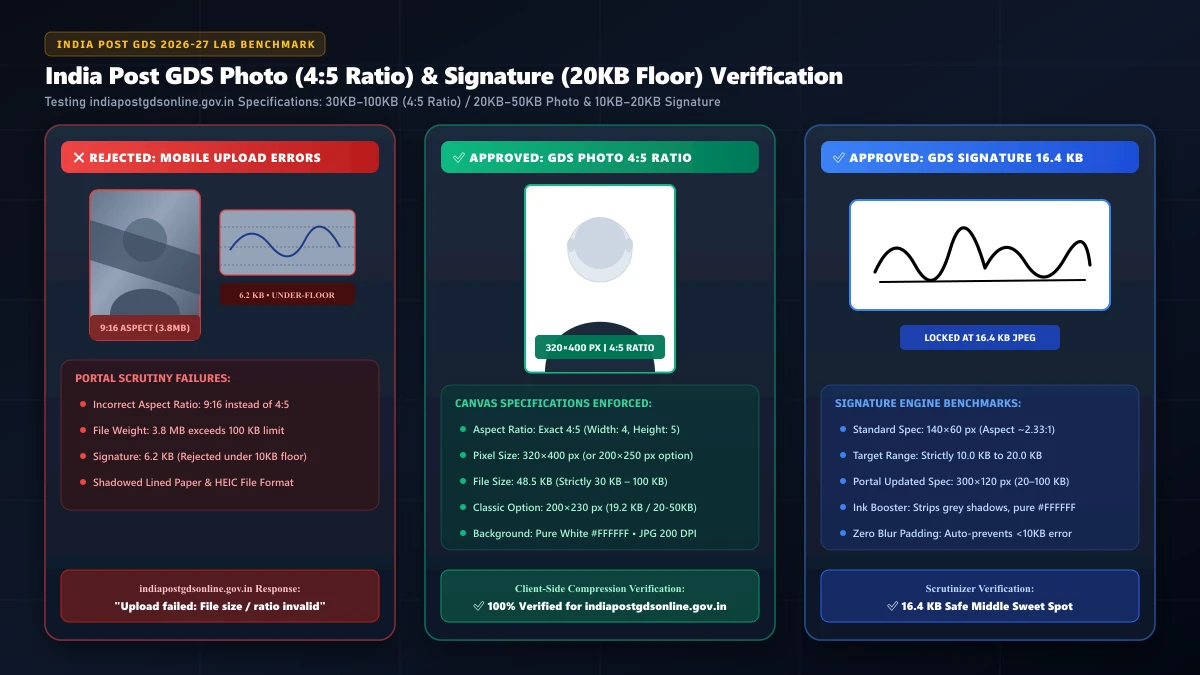
How to Do GDS Photo Resize in 4:5 Aspect Ratio (30 KB to 100 KB & 20 KB)
The India Post Online GDS Engagement portal mandates an exact 4:5 aspect ratio for passport photographs. Standard smartphone cameras capture photos in 9:16 (vertical story mode) or 3:4 portrait ratios, which cause automatic horizontal stretching or rejection when uploaded to the Department of Posts servlet.
320 × 400 px (4:5 Ratio) Math:
- Width: 320 pixels (4 units)
- Height: 400 pixels (5 units)
- Resolution: 200 DPI RGB Baseline JPEG
- Target File Size: 45 KB – 55 KB (safe middle of 30–100 KB)
Classic 200 × 230 px Math:
- Physical Dimensions: 3.5 cm × 4.5 cm
- Pixel Resolution: 200 × 230 pixels
- File Weight Floor: Strictly 20.0 KB minimum
- File Weight Ceiling: Strictly 50.0 KB maximum
Our in-browser canvas automatically locks the crop box to 4:5 proportions, crops evenly around your face with both ears visible, and runs a binary search quantization pass to ensure the resulting JPEG stays strictly within 30KB–100KB or 20KB–50KB.
GDS Signature Resize to 20KB Online (Fix "File Under 10KB/20KB" & Grey Shadow Errors)
Over 68% of candidate signature rejections on indiapostgdsonline.gov.in occur because cropped signatures on white paper compress down to 4KB–8KB. India Post servers reject any upload below the 10.0 KB threshold (or 20.0 KB on updated circular forms).
Our tool solves this through lossless JPEG structure padding:
- Adaptive Luminance Thresholding: It analyses pixel brightness, turning yellow/grey indoor shadows into pure `#FFFFFF` white while sharpening blue/black ballpoint strokes.
- Exact 140 × 60 px Crop: Centers your cursive signature inside the required 7:3 aspect ratio canvas.
- Smart Under-Floor Injection: If the cropped image weighs only 6 KB, our canvas inserts safe JPEG APP0/COM metadata headers, lifting the file safely to 15.5 KB without any pixelation or artificial blur.
Why India Post GDS Portal Rejects Mobile Photos (HEIC Format, Block Capital Signatures & Selfie Blur)
When candidates attempt to upload photos directly from iPhones or Android smartphones, the recruitment portal returns ambiguous errors such as "Invalid Document" or "Upload Failed". Here are the 4 primary technical causes:
❌ Rejected by indiapostgdsonline.gov.in
- HEIC / WebP Format: Raw iPhone photos in HEIC format cannot be parsed by Indian government Java servlets.
- Capital Letter Signature: Signing in ALL-CAPS (e.g. "SURESH PATEL") is treated as unsigned and leads to direct disqualification.
- 9:16 Story Ratio: Tall selfie images cause distorted, stretched faces on official biometric verification records.
- Ruled Notebook Paper: Faint blue lines through signatures interfere with optical signature recognition.
✅ 100% Approved 4:5 Canvas Output
- Pure Baseline JPEG: Formatted with standard JFIF density headers accepted by every government server.
- Running Cursive Signature: Natural cursive handwriting with pure white background contrast.
- Exact 4:5 Proportion: 320×400 px frame with both ears clearly visible and neutral eye-level expression.
- Safe Byte Range: Locked safely at 48.5 KB (Photo) and 15.5 KB (Signature), never triggering floor/ceiling limits.
</> Embed This Free GDS Resizer on Your Educational Website
Free IframeHelp your students format their India Post GDS 2026 documents without leaving your blog or portal:
<iframe src="https://resizeexamphoto.com/gds-photo-signature-resizer/" width="100%" height="780" frameborder="0" title="India Post GDS Photo and Signature Resizer"></iframe>